CapCut in 2026: Free AI Video Editing, Auto Captions, Background Removal — and Why the Price Isn't on the Website
I opened CapCut's official site and checked the home and AI editing tools with my own screenshots. Auto captions, background removal, text-to-speech and smart cutout are free; Pro unlocks 4K, motion tracking and AI video generation. The odd part: there's no pricing page on the web — it's set in-app by region (Pro typically $19.99/mo).
Talk about short-form editing and nine times out of ten CapCut comes up. If you touch YouTube, TikTok or Instagram shorts, it’s basically table stakes. Today I opened CapCut’s official site and went through the home page and its AI editing tools — every screenshot below is one I captured myself. One thing stood out: the price is nowhere on the website.

What is CapCut?
It’s an AI-based photo and video editor from ByteDance (TikTok’s parent). It runs on mobile, desktop and the web, and the home page leads with “an AI-based photo and video editor for everyone.” It has grown from a simple mobile cutting app into a full AI editing suite.
The free tier does more than you’d expect
CapCut’s real strength is how much sits in the free tier. Going through the AI editing tools section myself, here’s what’s free.
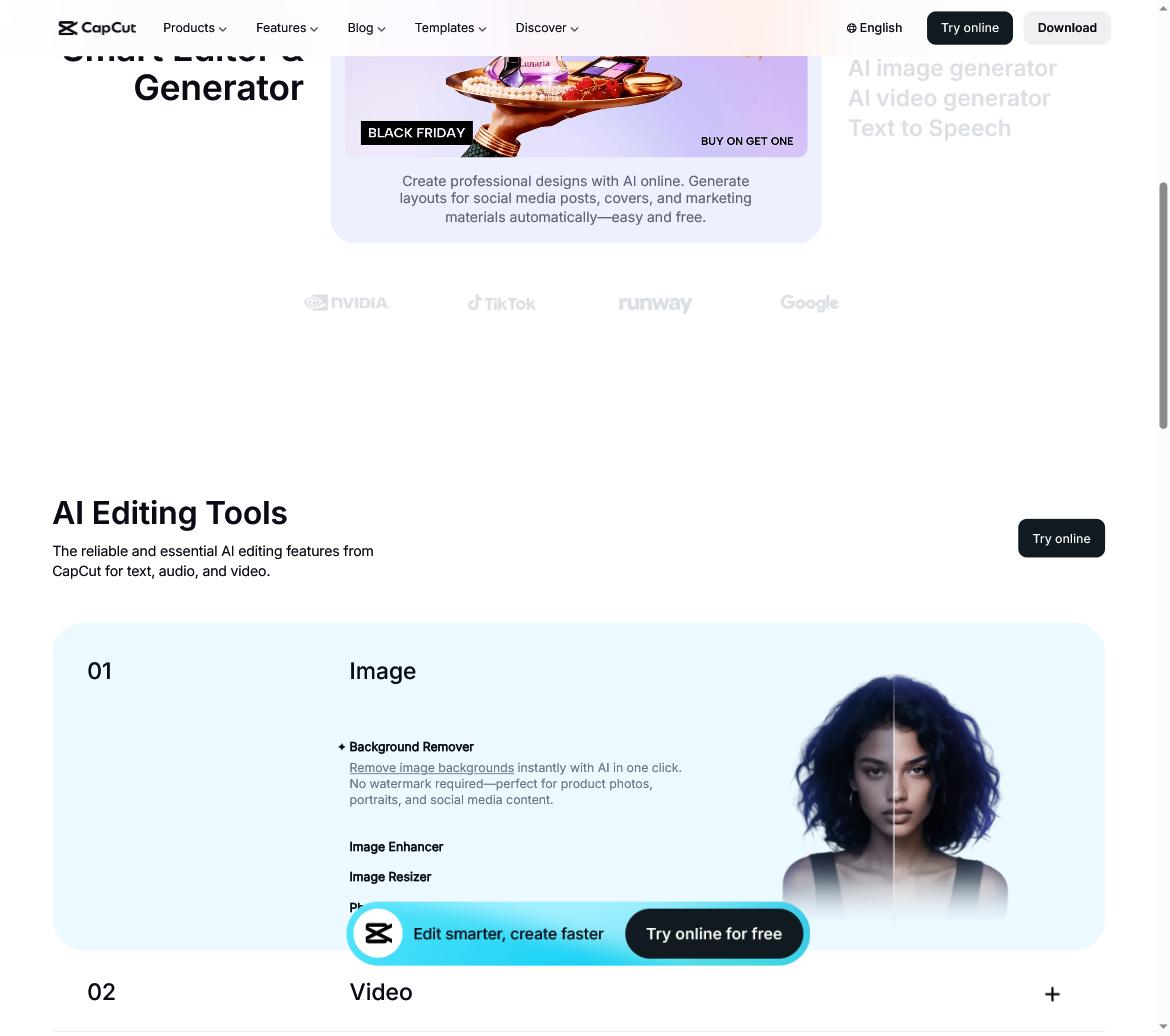
- Auto Captions — turns speech into subtitles automatically (a short-form must-have)
- Background Remover — one-click background removal, no watermark
- Text-to-Speech (TTS), smart cutout, image retouch and aspect-ratio tools
- Core editing (cut, split, multi-track, keyframes, chroma key) plus free music and 1080p export
For short-form creators, “auto captions + background removal” alone is reason enough to use it for free. If you want to polish the voice further, pair it with a voice tool like ElevenLabs; for AI video clips, combine it with Seedance.
What does Pro add?
Paying opens the real AI. You get 4K export, no time limit on auto captions, motion tracking, noise removal, an AI image generator and AI video generator (text-to-video), high-quality voice cloning and expanded cloud storage.
The price isn’t on the website (I checked)
Here’s today’s takeaway. Unlike most tools, CapCut has no pricing page on its site. Go to /pricing and you get a 404. That’s because CapCut sets prices inside the app’s Upgrade screen, by region, device and promotion. Based on external reports, the typical numbers look like this.
| Plan | Typical price | Note |
|---|---|---|
| Free | $0 | Full editing + basic AI + 1080p |
| Standard | ~$9.99/mo | Removes watermark |
| Pro | ~$19.99/mo · $179.99/yr | 4K + full AI |
The exact figure depends on your own account and country in the app’s Upgrade screen — don’t trust a fixed price you saw in an ad.
Where are the limits?
The free tier is powerful, but AI image/video generation, 4K and motion tracking are Pro-only. Because pricing varies by region and device, it’s hard to name one number, and auto-generated output (captions, voice) can have typos or odd intonation, so it needs a review pass. For stitching several AI tools into one flow, see the AI creator workflow.
FAQ
Q. How far does the free tier go? Auto captions, background removal, text-to-speech, smart cutout and other core AI, plus 1080p export, are all free. 4K, motion tracking and AI image/video generation are Pro-only.
Q. How much does it cost? CapCut doesn’t publish prices on its website; it sets them in the in-app Upgrade screen by region and device. Externally reported figures are around $9.99/mo for Standard and $19.99/mo ($179.99/yr) for Pro — confirm the exact amount in the app.
Q. Is CapCut good for short-form editing? Yes. Auto captions and background removal alone cut editing time dramatically, which makes it a strong starting point for YouTube, TikTok and Instagram shorts.
Related posts
 AI Tools
Canva AI (Magic Studio) How-To 2026: Image Generation, Magic Tools, and Verified Pricing
No design skills? A prompt gets you a draft - I checked the official site directly today
 AI Tools
HeyGen How-To 2026: AI Avatars, 175+ Language Video Translation, and Real Verified Pricing
I checked the official site directly today - the pricing floating around search is stale; here's what's real
 AI Tools
ChatGPT Atlas Shutdown 2026: Moving Bookmarks and Browser Workflows
Your chats survive the Atlas shutdown; your bookmarks, tabs, and browser history may not